Overview of swisstopopy#
[ ]:
import contextily as cx
import matplotlib.pyplot as plt
import rasterio as rio
from rasterio import plot

import swisstopopy
Navigating STAC collections#
Let us start by getting a geo-data frame with the swissALTI3D items in our region of interest:
[ ]:
region = "EPFL"
client = swisstopopy.SwissTopoClient(region)

alti3d_gdf = client.get_collection_gdf(
    swisstopopy.SWISSALTI3D_COLLECTION_ID,
)
alti3d_gdf.head()
| id | collection | type | stac_version | bbox | stac_extensions | links | geometry.type | geometry.coordinates | properties.datetime | properties.created | properties.updated | geometry | assets.checksum:multihash | assets.created | assets.eo:gsd | assets.href | assets.proj:epsg | assets.type | assets.updated | |
|---|---|---|---|---|---|---|---|---|---|---|---|---|---|---|---|---|---|---|---|---|
| 0 | swissalti3d_2019_2532-1151 | ch.swisstopo.swissalti3d | Feature | 0.9.0 | [6.5525481, 46.5068432, 6.565723, 46.5159392] | [https://stac-extensions.github.io/timestamps/... | [{'rel': 'self', 'href': 'https://data.geo.adm... | Polygon | [[[6.5526955, 46.5068432], [6.565723, 46.50694... | 2019-01-01 00:00:00+00:00 | 2021-02-10 10:47:06.111266+00:00 | 2025-01-16 14:51:17.195380+00:00 | POLYGON ((6.56572 46.50684, 6.56572 46.51594, ... | 1220BEF35C33758E7EA4744487F4D8248AABFD50018615... | 2021-02-10T10:47:06.715269Z | 0.5 | https://data.geo.admin.ch/ch.swisstopo.swissal... | 2056.0 | image/tiff; application=geotiff; profile=cloud... | 2025-01-14T19:16:07.401260Z |
| 1 | swissalti3d_2019_2532-1151 | ch.swisstopo.swissalti3d | Feature | 0.9.0 | [6.5525481, 46.5068432, 6.565723, 46.5159392] | [https://stac-extensions.github.io/timestamps/... | [{'rel': 'self', 'href': 'https://data.geo.adm... | Polygon | [[[6.5526955, 46.5068432], [6.565723, 46.50694... | 2019-01-01 00:00:00+00:00 | 2021-02-10 10:47:06.111266+00:00 | 2025-01-16 14:51:17.195380+00:00 | POLYGON ((6.56572 46.50684, 6.56572 46.51594, ... | 122019D8A5B9699E742E9B9C80A9FF578F212964FA696B... | 2021-02-10T21:50:24.415324Z | 0.5 | https://data.geo.admin.ch/ch.swisstopo.swissal... | 2056.0 | application/x.ascii-xyz+zip | 2025-01-16T05:32:15.544527Z |
| 2 | swissalti3d_2019_2532-1151 | ch.swisstopo.swissalti3d | Feature | 0.9.0 | [6.5525481, 46.5068432, 6.565723, 46.5159392] | [https://stac-extensions.github.io/timestamps/... | [{'rel': 'self', 'href': 'https://data.geo.adm... | Polygon | [[[6.5526955, 46.5068432], [6.565723, 46.50694... | 2019-01-01 00:00:00+00:00 | 2021-02-10 10:47:06.111266+00:00 | 2025-01-16 14:51:17.195380+00:00 | POLYGON ((6.56572 46.50684, 6.56572 46.51594, ... | 122001B2679E302B56CE10F69CFF575A220535DA7E7C10... | 2021-02-10T16:31:54.449898Z | 2.0 | https://data.geo.admin.ch/ch.swisstopo.swissal... | 2056.0 | image/tiff; application=geotiff; profile=cloud... | 2025-01-15T09:46:18.615990Z |
| 3 | swissalti3d_2019_2532-1151 | ch.swisstopo.swissalti3d | Feature | 0.9.0 | [6.5525481, 46.5068432, 6.565723, 46.5159392] | [https://stac-extensions.github.io/timestamps/... | [{'rel': 'self', 'href': 'https://data.geo.adm... | Polygon | [[[6.5526955, 46.5068432], [6.565723, 46.50694... | 2019-01-01 00:00:00+00:00 | 2021-02-10 10:47:06.111266+00:00 | 2025-01-16 14:51:17.195380+00:00 | POLYGON ((6.56572 46.50684, 6.56572 46.51594, ... | 1220CF5E49901BE53ECBC7F3BB411B23D9581756687DC6... | 2021-02-11T22:12:30.704969Z | 2.0 | https://data.geo.admin.ch/ch.swisstopo.swissal... | 2056.0 | application/x.ascii-xyz+zip | 2025-01-16T14:51:17.195380Z |
| 4 | swissalti3d_2019_2532-1152 | ch.swisstopo.swissalti3d | Feature | 0.9.0 | [6.5524006, 46.5158382, 6.5655778, 46.5249343] | [https://stac-extensions.github.io/timestamps/... | [{'rel': 'self', 'href': 'https://data.geo.adm... | Polygon | [[[6.5525481, 46.5158382], [6.5655778, 46.5159... | 2019-01-01 00:00:00+00:00 | 2021-02-10 10:49:41.964859+00:00 | 2025-01-16 15:06:19.535010+00:00 | POLYGON ((6.56558 46.51584, 6.56558 46.52493, ... | 12205790D9862A7BFB265E59B08814D8E44227441DD80B... | 2021-02-10T10:49:42.615492Z | 0.5 | https://data.geo.admin.ch/ch.swisstopo.swissal... | 2056.0 | image/tiff; application=geotiff; profile=cloud... | 2025-01-14T19:26:09.858728Z |
Even though there are 24 items, there are only 3 distinct tile geometries:
[ ]:
ax = alti3d_gdf.plot(alpha=0.1)
cx.add_basemap(ax, crs=alti3d_gdf.crs)
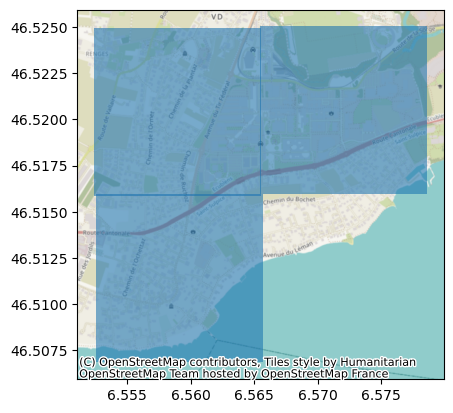
Given the way in which swissALTI3D (and many other swisstopo datasets) is distributed, namely in 1 km\(²\) tiles, we can actually infer each distinct tile geometry from the “id” column, which follows the format collection_year_tile-id, e.g., in this case, for the first item collection is swissalti3d, year is 2019 and tile-id is 2532-1151.
Therefore, we have 24 items because it corresponds to 3 unique tile geometries but for 2 different tiles (2019 and 2021), 2 different ground resolutions (0.5 m and 2 m) and 2 different file formats (tiff and xyz). Therefore, we can filter to get only items of a given year:
[ ]:
alti3d_gdf[alti3d_gdf["properties.datetime"].dt.year == 2019].head()
| id | collection | type | stac_version | bbox | stac_extensions | links | geometry.type | geometry.coordinates | properties.datetime | properties.created | properties.updated | geometry | assets.checksum:multihash | assets.created | assets.eo:gsd | assets.href | assets.proj:epsg | assets.type | assets.updated | |
|---|---|---|---|---|---|---|---|---|---|---|---|---|---|---|---|---|---|---|---|---|
| 0 | swissalti3d_2019_2532-1151 | ch.swisstopo.swissalti3d | Feature | 0.9.0 | [6.5525481, 46.5068432, 6.565723, 46.5159392] | [https://stac-extensions.github.io/timestamps/... | [{'rel': 'self', 'href': 'https://data.geo.adm... | Polygon | [[[6.5526955, 46.5068432], [6.565723, 46.50694... | 2019-01-01 00:00:00+00:00 | 2021-02-10 10:47:06.111266+00:00 | 2025-01-16 14:51:17.195380+00:00 | POLYGON ((6.56572 46.50684, 6.56572 46.51594, ... | 1220BEF35C33758E7EA4744487F4D8248AABFD50018615... | 2021-02-10T10:47:06.715269Z | 0.5 | https://data.geo.admin.ch/ch.swisstopo.swissal... | 2056.0 | image/tiff; application=geotiff; profile=cloud... | 2025-01-14T19:16:07.401260Z |
| 1 | swissalti3d_2019_2532-1151 | ch.swisstopo.swissalti3d | Feature | 0.9.0 | [6.5525481, 46.5068432, 6.565723, 46.5159392] | [https://stac-extensions.github.io/timestamps/... | [{'rel': 'self', 'href': 'https://data.geo.adm... | Polygon | [[[6.5526955, 46.5068432], [6.565723, 46.50694... | 2019-01-01 00:00:00+00:00 | 2021-02-10 10:47:06.111266+00:00 | 2025-01-16 14:51:17.195380+00:00 | POLYGON ((6.56572 46.50684, 6.56572 46.51594, ... | 122019D8A5B9699E742E9B9C80A9FF578F212964FA696B... | 2021-02-10T21:50:24.415324Z | 0.5 | https://data.geo.admin.ch/ch.swisstopo.swissal... | 2056.0 | application/x.ascii-xyz+zip | 2025-01-16T05:32:15.544527Z |
| 2 | swissalti3d_2019_2532-1151 | ch.swisstopo.swissalti3d | Feature | 0.9.0 | [6.5525481, 46.5068432, 6.565723, 46.5159392] | [https://stac-extensions.github.io/timestamps/... | [{'rel': 'self', 'href': 'https://data.geo.adm... | Polygon | [[[6.5526955, 46.5068432], [6.565723, 46.50694... | 2019-01-01 00:00:00+00:00 | 2021-02-10 10:47:06.111266+00:00 | 2025-01-16 14:51:17.195380+00:00 | POLYGON ((6.56572 46.50684, 6.56572 46.51594, ... | 122001B2679E302B56CE10F69CFF575A220535DA7E7C10... | 2021-02-10T16:31:54.449898Z | 2.0 | https://data.geo.admin.ch/ch.swisstopo.swissal... | 2056.0 | image/tiff; application=geotiff; profile=cloud... | 2025-01-15T09:46:18.615990Z |
| 3 | swissalti3d_2019_2532-1151 | ch.swisstopo.swissalti3d | Feature | 0.9.0 | [6.5525481, 46.5068432, 6.565723, 46.5159392] | [https://stac-extensions.github.io/timestamps/... | [{'rel': 'self', 'href': 'https://data.geo.adm... | Polygon | [[[6.5526955, 46.5068432], [6.565723, 46.50694... | 2019-01-01 00:00:00+00:00 | 2021-02-10 10:47:06.111266+00:00 | 2025-01-16 14:51:17.195380+00:00 | POLYGON ((6.56572 46.50684, 6.56572 46.51594, ... | 1220CF5E49901BE53ECBC7F3BB411B23D9581756687DC6... | 2021-02-11T22:12:30.704969Z | 2.0 | https://data.geo.admin.ch/ch.swisstopo.swissal... | 2056.0 | application/x.ascii-xyz+zip | 2025-01-16T14:51:17.195380Z |
| 4 | swissalti3d_2019_2532-1152 | ch.swisstopo.swissalti3d | Feature | 0.9.0 | [6.5524006, 46.5158382, 6.5655778, 46.5249343] | [https://stac-extensions.github.io/timestamps/... | [{'rel': 'self', 'href': 'https://data.geo.adm... | Polygon | [[[6.5525481, 46.5158382], [6.5655778, 46.5159... | 2019-01-01 00:00:00+00:00 | 2021-02-10 10:49:41.964859+00:00 | 2025-01-16 15:06:19.535010+00:00 | POLYGON ((6.56558 46.51584, 6.56558 46.52493, ... | 12205790D9862A7BFB265E59B08814D8E44227441DD80B... | 2021-02-10T10:49:42.615492Z | 0.5 | https://data.geo.admin.ch/ch.swisstopo.swissal... | 2056.0 | image/tiff; application=geotiff; profile=cloud... | 2025-01-14T19:26:09.858728Z |
or to get the latest item of each combination of resolution and file extension:
[ ]:
swisstopopy.get_latest(alti3d_gdf).head()
| id | collection | type | stac_version | bbox | stac_extensions | links | geometry.type | geometry.coordinates | properties.datetime | properties.created | properties.updated | geometry | assets.checksum:multihash | assets.created | assets.eo:gsd | assets.href | assets.proj:epsg | assets.type | assets.updated | |
|---|---|---|---|---|---|---|---|---|---|---|---|---|---|---|---|---|---|---|---|---|
| 0 | swissalti3d_2021_2532-1151 | ch.swisstopo.swissalti3d | Feature | 0.9.0 | [6.5525481, 46.5068432, 6.565723, 46.5159392] | [https://stac-extensions.github.io/timestamps/... | [{'rel': 'self', 'href': 'https://data.geo.adm... | Polygon | [[[6.5526955, 46.5068432], [6.565723, 46.50694... | 2021-01-01 00:00:00+00:00 | 2021-09-02 16:46:12.695971+00:00 | 2025-01-18 02:03:21.314035+00:00 | POLYGON ((6.56572 46.50684, 6.56572 46.51594, ... | 1220A1EB829DC0AEFA4B10F687F5C05FC2AA4F59F6B622... | 2021-09-02T19:09:22.472399Z | 0.5 | https://data.geo.admin.ch/ch.swisstopo.swissal... | 2056.0 | application/x.ascii-xyz+zip | 2025-01-18T00:05:10.539193Z |
| 1 | swissalti3d_2021_2532-1151 | ch.swisstopo.swissalti3d | Feature | 0.9.0 | [6.5525481, 46.5068432, 6.565723, 46.5159392] | [https://stac-extensions.github.io/timestamps/... | [{'rel': 'self', 'href': 'https://data.geo.adm... | Polygon | [[[6.5526955, 46.5068432], [6.565723, 46.50694... | 2021-01-01 00:00:00+00:00 | 2021-09-02 16:46:12.695971+00:00 | 2025-01-18 02:03:21.314035+00:00 | POLYGON ((6.56572 46.50684, 6.56572 46.51594, ... | 12203761E09265F46BC92A89AB60D7003202574ADBED5B... | 2021-09-02T16:46:13.207732Z | 2.0 | https://data.geo.admin.ch/ch.swisstopo.swissal... | 2056.0 | application/x.ascii-xyz+zip | 2025-01-17T23:06:08.845852Z |
| 2 | swissalti3d_2021_2532-1151 | ch.swisstopo.swissalti3d | Feature | 0.9.0 | [6.5525481, 46.5068432, 6.565723, 46.5159392] | [https://stac-extensions.github.io/timestamps/... | [{'rel': 'self', 'href': 'https://data.geo.adm... | Polygon | [[[6.5526955, 46.5068432], [6.565723, 46.50694... | 2021-01-01 00:00:00+00:00 | 2021-09-02 16:46:12.695971+00:00 | 2025-01-18 02:03:21.314035+00:00 | POLYGON ((6.56572 46.50684, 6.56572 46.51594, ... | 1220B9AD77D6DD070409D209F5ADF17EC7253FC3FE6CEE... | 2021-09-03T00:35:29.891683Z | 0.5 | https://data.geo.admin.ch/ch.swisstopo.swissal... | 2056.0 | image/tiff; application=geotiff; profile=cloud... | 2025-01-18T01:04:21.184877Z |
| 3 | swissalti3d_2021_2532-1151 | ch.swisstopo.swissalti3d | Feature | 0.9.0 | [6.5525481, 46.5068432, 6.565723, 46.5159392] | [https://stac-extensions.github.io/timestamps/... | [{'rel': 'self', 'href': 'https://data.geo.adm... | Polygon | [[[6.5526955, 46.5068432], [6.565723, 46.50694... | 2021-01-01 00:00:00+00:00 | 2021-09-02 16:46:12.695971+00:00 | 2025-01-18 02:03:21.314035+00:00 | POLYGON ((6.56572 46.50684, 6.56572 46.51594, ... | 122093E32E6D175B9F148409FCAA8708073303A8E94A8E... | 2021-09-03T01:36:23.594881Z | 2.0 | https://data.geo.admin.ch/ch.swisstopo.swissal... | 2056.0 | image/tiff; application=geotiff; profile=cloud... | 2025-01-18T02:03:21.314035Z |
| 4 | swissalti3d_2021_2532-1152 | ch.swisstopo.swissalti3d | Feature | 0.9.0 | [6.5524006, 46.5158382, 6.5655778, 46.5249343] | [https://stac-extensions.github.io/timestamps/... | [{'rel': 'self', 'href': 'https://data.geo.adm... | Polygon | [[[6.5525481, 46.5158382], [6.5655778, 46.5159... | 2021-01-01 00:00:00+00:00 | 2021-09-02 16:56:28.144164+00:00 | 2025-01-18 02:16:20.318007+00:00 | POLYGON ((6.56558 46.51584, 6.56558 46.52493, ... | 122020D17CB98AAE4FECDBC563D0673AF8797EFD2D74C6... | 2021-09-02T20:24:35.219858Z | 0.5 | https://data.geo.admin.ch/ch.swisstopo.swissal... | 2056.0 | application/x.ascii-xyz+zip | 2025-01-18T00:17:16.038110Z |
We can also easily filter the items by the ground resolution and/or file extension, e.g.:
[ ]:
alti3d_gdf[
    (alti3d_gdf["assets.eo:gsd"] == 0.5)
    & alti3d_gdf["assets.href"].str.endswith(".tif")
]
| id | collection | type | stac_version | bbox | stac_extensions | links | geometry.type | geometry.coordinates | properties.datetime | properties.created | properties.updated | geometry | assets.checksum:multihash | assets.created | assets.eo:gsd | assets.href | assets.proj:epsg | assets.type | assets.updated | |
|---|---|---|---|---|---|---|---|---|---|---|---|---|---|---|---|---|---|---|---|---|
| 0 | swissalti3d_2019_2532-1151 | ch.swisstopo.swissalti3d | Feature | 0.9.0 | [6.5525481, 46.5068432, 6.565723, 46.5159392] | [https://stac-extensions.github.io/timestamps/... | [{'rel': 'self', 'href': 'https://data.geo.adm... | Polygon | [[[6.5526955, 46.5068432], [6.565723, 46.50694... | 2019-01-01 00:00:00+00:00 | 2021-02-10 10:47:06.111266+00:00 | 2025-01-16 14:51:17.195380+00:00 | POLYGON ((6.56572 46.50684, 6.56572 46.51594, ... | 1220BEF35C33758E7EA4744487F4D8248AABFD50018615... | 2021-02-10T10:47:06.715269Z | 0.5 | https://data.geo.admin.ch/ch.swisstopo.swissal... | 2056.0 | image/tiff; application=geotiff; profile=cloud... | 2025-01-14T19:16:07.401260Z |
| 4 | swissalti3d_2019_2532-1152 | ch.swisstopo.swissalti3d | Feature | 0.9.0 | [6.5524006, 46.5158382, 6.5655778, 46.5249343] | [https://stac-extensions.github.io/timestamps/... | [{'rel': 'self', 'href': 'https://data.geo.adm... | Polygon | [[[6.5525481, 46.5158382], [6.5655778, 46.5159... | 2019-01-01 00:00:00+00:00 | 2021-02-10 10:49:41.964859+00:00 | 2025-01-16 15:06:19.535010+00:00 | POLYGON ((6.56558 46.51584, 6.56558 46.52493, ... | 12205790D9862A7BFB265E59B08814D8E44227441DD80B... | 2021-02-10T10:49:42.615492Z | 0.5 | https://data.geo.admin.ch/ch.swisstopo.swissal... | 2056.0 | image/tiff; application=geotiff; profile=cloud... | 2025-01-14T19:26:09.858728Z |
| 8 | swissalti3d_2019_2533-1152 | ch.swisstopo.swissalti3d | Feature | 0.9.0 | [6.5654325, 46.5159392, 6.5786075, 46.5250338] | [https://stac-extensions.github.io/timestamps/... | [{'rel': 'self', 'href': 'https://data.geo.adm... | Polygon | [[[6.5655778, 46.5159392], [6.5786075, 46.5160... | 2019-01-01 00:00:00+00:00 | 2021-02-10 10:49:43.859413+00:00 | 2025-01-16 15:06:20.632461+00:00 | POLYGON ((6.57861 46.51594, 6.57861 46.52503, ... | 1220788F6FB6067294E92CE78ACBC070B25CB9632D5910... | 2021-02-10T10:49:44.535488Z | 0.5 | https://data.geo.admin.ch/ch.swisstopo.swissal... | 2056.0 | image/tiff; application=geotiff; profile=cloud... | 2025-01-14T19:26:10.809428Z |
| 12 | swissalti3d_2021_2532-1151 | ch.swisstopo.swissalti3d | Feature | 0.9.0 | [6.5525481, 46.5068432, 6.565723, 46.5159392] | [https://stac-extensions.github.io/timestamps/... | [{'rel': 'self', 'href': 'https://data.geo.adm... | Polygon | [[[6.5526955, 46.5068432], [6.565723, 46.50694... | 2021-01-01 00:00:00+00:00 | 2021-09-02 16:46:12.695971+00:00 | 2025-01-18 02:03:21.314035+00:00 | POLYGON ((6.56572 46.50684, 6.56572 46.51594, ... | 1220B9AD77D6DD070409D209F5ADF17EC7253FC3FE6CEE... | 2021-09-03T00:35:29.891683Z | 0.5 | https://data.geo.admin.ch/ch.swisstopo.swissal... | 2056.0 | image/tiff; application=geotiff; profile=cloud... | 2025-01-18T01:04:21.184877Z |
| 16 | swissalti3d_2021_2532-1152 | ch.swisstopo.swissalti3d | Feature | 0.9.0 | [6.5524006, 46.5158382, 6.5655778, 46.5249343] | [https://stac-extensions.github.io/timestamps/... | [{'rel': 'self', 'href': 'https://data.geo.adm... | Polygon | [[[6.5525481, 46.5158382], [6.5655778, 46.5159... | 2021-01-01 00:00:00+00:00 | 2021-09-02 16:56:28.144164+00:00 | 2025-01-18 02:16:20.318007+00:00 | POLYGON ((6.56558 46.51584, 6.56558 46.52493, ... | 122089C474AEF62CC4692D7A944AFC0A13162D3DD8D0CF... | 2021-09-03T00:49:42.276133Z | 0.5 | https://data.geo.admin.ch/ch.swisstopo.swissal... | 2056.0 | image/tiff; application=geotiff; profile=cloud... | 2025-01-18T01:18:11.426964Z |
| 20 | swissalti3d_2021_2533-1152 | ch.swisstopo.swissalti3d | Feature | 0.9.0 | [6.5654325, 46.5159392, 6.5786075, 46.5250338] | [https://stac-extensions.github.io/timestamps/... | [{'rel': 'self', 'href': 'https://data.geo.adm... | Polygon | [[[6.5655778, 46.5159392], [6.5786075, 46.5160... | 2021-01-01 00:00:00+00:00 | 2021-09-02 16:56:34.537212+00:00 | 2025-01-18 02:17:06.919621+00:00 | POLYGON ((6.57861 46.51594, 6.57861 46.52503, ... | 1220B8B7EA9C14DD41021131A873BD5B76DC0642CBC374... | 2021-09-03T00:49:54.457903Z | 0.5 | https://data.geo.admin.ch/ch.swisstopo.swissal... | 2056.0 | image/tiff; application=geotiff; profile=cloud... | 2025-01-18T01:18:15.270233Z |
STAC data processing into raster products#
Besides the simplified interface to navigate swisstopo STAC collections, swisstopopy includes a few functions to automatically obtain useful raster products.
Building footprints with estimated heights#
We can get building footprints from the OpenStreetMap (OSM) (using osmnx) and then infer building heights using the difference between swissSURFACE3D Raster, a digital surface model (DSM) and swissALTI3D, a digital elevation model (DEM). This is all managed through the get_bldg_gdf
function, which will return a geo-data frame of building footprints, OSM attributes and inferred building height (in the “height” column):
[ ]:
bldg_gdf = swisstopopy.get_bldg_gdf(region)

ax = bldg_gdf.plot("height", legend=True)
cx.add_basemap(ax, crs=bldg_gdf.crs)
 33%|█████████████████                                  | 1/3 [00:00<00:00,  3.77it/s]/home/martibosch/miniforge3/envs/swisstopopy/lib/python3.13/site-packages/rasterstats/io.py:335: NodataWarning: Setting nodata to -999; specify nodata explicitly
  warnings.warn(
100%|███████████████████████████████████████████████████| 3/3 [00:01<00:00,  2.73it/s]
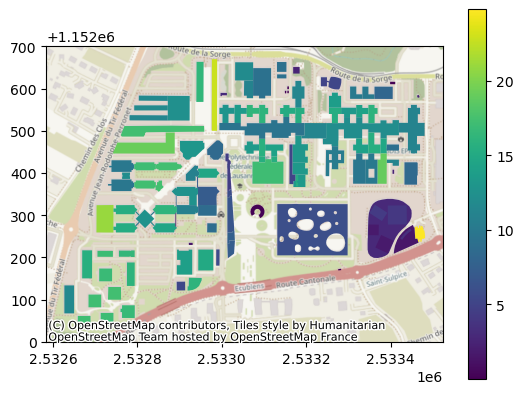
By default, the latest available swissSURFACE3D Raster and swissALTI3D data will be used, but this can be changed using the item_datetime keyword argument. Similarly, the resolution of the data (by default 0.5 m) can be changed using the item_res keyword argument (note that the resolution should be the same for both collections to compute the raster difference).
Digital elevation model (DEM)#
We can use the get_dem_raster to easily get a DEM of any part of Switzerland:
[ ]:
dst_filepath = "dem.tif"
swisstopopy.get_dem_raster(region, dst_filepath)

fig, ax = plt.subplots()
with rio.open(dst_filepath) as src:
    retted = plot.show(src, ax=ax)
fig.colorbar(retted.get_images()[0], ax=ax)
100%|█████████████████████████████████████████████████| 3/3 [00:00<00:00, 2762.44it/s]
<matplotlib.colorbar.Colorbar at 0x730d3008a850>
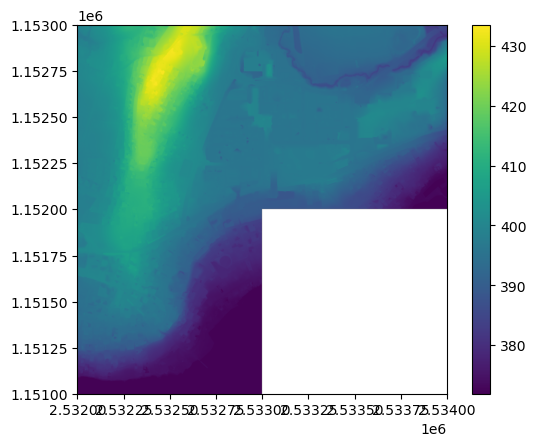
By default, the latest data for each tile will be used at a resolution of 0.5 m, but this can be changed via the alti3d_datetime and alti3d_res keyword arguments respectively.
Tree canopy raster#
A tree canopy raster can be obtained by filtering high vegetation points from the swissSURFACE3D dataset and rasterizing it to a user-defined resolution. This can be done using the get_tree_canopy_raster function:
[ ]:
dst_filepath = "tree-canopy.tif"
swisstopopy.get_tree_canopy_raster(region, dst_filepath)

with rio.open(dst_filepath) as src:
    retted = plot.show(src)
  0%|                                                           | 0/3 [00:00<?, ?it/s]Downloading data from 'https://data.geo.admin.ch/ch.swisstopo.swisssurface3d/swisssurface3d_2019_2532-1151/swisssurface3d_2019_2532-1151_2056_5728.las.zip' to file '/tmp/tmpwk2gcgff/1c03c446a7b6f85fe9d68bdc70c90916-swisssurface3d_2019_2532-1151_2056_5728.las.zip'.
SHA256 hash of downloaded file: c8ec0d2ae2a32c3ddf9f41711275078de7b229319de017fa6ff6797b1dd97ced
Use this value as the 'known_hash' argument of 'pooch.retrieve' to ensure that the file hasn't changed if it is downloaded again in the future.
Unzipping contents of '/tmp/tmpwk2gcgff/1c03c446a7b6f85fe9d68bdc70c90916-swisssurface3d_2019_2532-1151_2056_5728.las.zip' to '/tmp/tmpwk2gcgff/1c03c446a7b6f85fe9d68bdc70c90916-swisssurface3d_2019_2532-1151_2056_5728.las.zip.unzip'
 33%|█████████████████                                  | 1/3 [00:12<00:25, 12.87s/it]Downloading data from 'https://data.geo.admin.ch/ch.swisstopo.swisssurface3d/swisssurface3d_2019_2532-1152/swisssurface3d_2019_2532-1152_2056_5728.las.zip' to file '/tmp/tmpwk2gcgff/86f648067f304b5e665d67014c7593f3-swisssurface3d_2019_2532-1152_2056_5728.las.zip'.
SHA256 hash of downloaded file: dc0490ca940e5e1c81a3e7cbc21054ebbe216be1c64e91b9af5e325b73df1921
Use this value as the 'known_hash' argument of 'pooch.retrieve' to ensure that the file hasn't changed if it is downloaded again in the future.
Unzipping contents of '/tmp/tmpwk2gcgff/86f648067f304b5e665d67014c7593f3-swisssurface3d_2019_2532-1152_2056_5728.las.zip' to '/tmp/tmpwk2gcgff/86f648067f304b5e665d67014c7593f3-swisssurface3d_2019_2532-1152_2056_5728.las.zip.unzip'
 67%|██████████████████████████████████                 | 2/3 [00:26<00:13, 13.27s/it]Downloading data from 'https://data.geo.admin.ch/ch.swisstopo.swisssurface3d/swisssurface3d_2019_2533-1152/swisssurface3d_2019_2533-1152_2056_5728.las.zip' to file '/tmp/tmpwk2gcgff/b6c098c0bf5104e790d8733cb8067080-swisssurface3d_2019_2533-1152_2056_5728.las.zip'.
SHA256 hash of downloaded file: a29847b7eae9c59783222a7236957d4dd27cc156b390e0f51c8381a78b2ba21b
Use this value as the 'known_hash' argument of 'pooch.retrieve' to ensure that the file hasn't changed if it is downloaded again in the future.
Unzipping contents of '/tmp/tmpwk2gcgff/b6c098c0bf5104e790d8733cb8067080-swisssurface3d_2019_2533-1152_2056_5728.las.zip' to '/tmp/tmpwk2gcgff/b6c098c0bf5104e790d8733cb8067080-swisssurface3d_2019_2533-1152_2056_5728.las.zip.unzip'
100%|███████████████████████████████████████████████████| 3/3 [00:42<00:00, 14.23s/it]
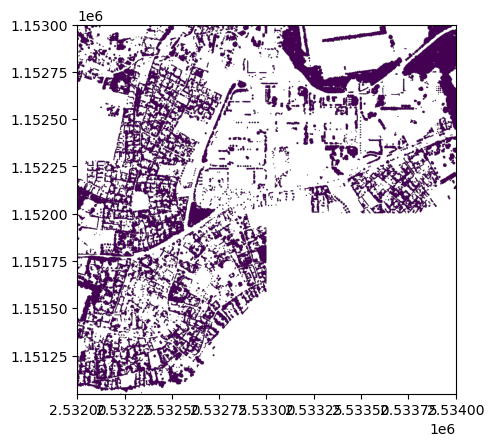
Note that this requires PDAL and its Python bindings, which are not installed by default with swisstopopy. The easiest way to install such requirements is using conda/mamba, e.g.: conda install -c conda-forge python-pdal.